Release notes

What's new in Appstack

Everything we've shipped, newest first.

Appstack
10
Release notes

Stripe goes live, two new integrations land, and you can finally duplicate anything across your workspace

We missed our last release note, so this one's a double batch covering the past four weeks, no manual required, just scroll and enjoy.

Big announcement

Duplicate views and widgets across your whole workspace

You can now duplicate any view or widget and reuse it across dashboards, cohort views, and even different projects, no more rebuilding the same chart from scratch every time.

01

Stripe is fully wired up

Our Stripe integration is finalized, with proceeds calculated automatically using Stripe's standard rate, so subscription revenue from Stripe now shows up correctly across your dashboards and cohorts.

02

Two new integrations: Qonversion and Pinterest

Qonversion and Pinterest are now supported, so you can bring in subscription data from Qonversion and attribution for Pinterest campaigns just like your other networks.

New

8
  • Emoji icons for dashboards and cohortsDashboards and cohort tables can now use an emoji as their icon, so they're easier to spot at a glance in a long list.
  • Default cohort viewsNew cohort tables now come with two views already set up for you, one for ROAS and one for Revenue, so you're not starting from a blank table.
  • Custom ROAS from custom eventsYou can now build a custom ROAS metric using the value of your own custom events, not just the built-in revenue events.
  • See exactly what's been sentWe added a page that shows exactly what's been sent for each app and event, so you can check your own data without guessing.
  • Webhooks for Link in-app eventsStandard links can now send their in-app events to a webhook, so you can forward that data to tools we don't natively integrate with, like OpenAI Ads or an affiliate platform.
  • Onboarding quiz for new accountsNew accounts now get a short onboarding quiz that recommends the metrics and charts most relevant to their type of app.
  • Standard links in the MCPOur MCP connection can now surface standard links details too, like custom parameters.
  • Dynamic onboarding dashboardNew accounts now land on a dashboard tailored to their onboarding answers instead of a generic default.

Improved

12
  • Links deactivate on downgradeIf an organization gets downgraded to the Starter plan, its links are now deactivated to match, with a clear warning well before it happens.
  • Removed the fake ad-spend fieldWe removed the manual ad-spend field from the standard link editor since it wasn't reflecting real data and only caused confusion.
  • No more auto-formatted namesEvent, campaign, ad, and keyword names in your dashboards and cohorts are no longer auto-formatted, so they show up exactly as you named them.
  • Hover for long filter namesLong filter and campaign names can now be hovered to read the full text instead of getting cut off.
  • Blocked shared iOS/Android datasetsTrying to use the same Meta dataset for both your iOS and Android apps now gets blocked with a warning, since that was quietly messing up your reporting and Meta's own optimization.
  • Smarter coverage-drop alertsCoverage-drop alerts are now smarter, only firing when the drop affects the specific event you're actually optimizing toward, not every small dip.
  • MCP now works at the user levelThe MCP connection now works at the user level, so you don't have to reconnect every time you switch between projects or organizations.
  • MCP skill for Claude chat and desktopOur Claude skill can now be installed directly in Claude's chat and desktop apps, not just Claude Code, so non-technical teammates can use it too.
  • Clearer MCP term matchingThe MCP assistant now understands ambiguous terms like "web installs" versus "EAC installs" more reliably instead of guessing wrong.
  • MCP flags weird-looking dataThe MCP assistant now flags when the numbers it's showing you look off, like negative values or mismatched totals, instead of returning them silently.
  • Faster past-due notificationsPast-due accounts now get notified by email right away instead of waiting for the next scheduled check.
  • Consistent light and dark mode colorsWe normalized how colors map between light and dark mode, so things look consistent switching between them.

Fixed

9
  • Inconsistent renewal event namesRenewal events from RevenueCat and Superwall could show up under different names depending on where you looked, exports, reports, or cohorts, we aligned them all to be consistent.
  • Onboarding checklist false positiveAdding an app without a URL made the onboarding checklist think that step was already done, that's fixed.
  • Phantom line in country chartsA dashboard chart grouped by country could show an extra, unlabeled line that didn't match any country or "Others" in the tooltip, that duplicate is gone now.
  • Missing CPA on breakdownsCPA showed as a dash instead of a number when you grouped results by campaign, even though the overall total was correct, that's fixed.
  • False purchase-event warningApps that only use in-app purchases were getting a false warning about missing purchase events, that's fixed.
  • MCP showing raw field namesMCP answers were showing raw internal field names instead of plain language, that's cleaned up now.
  • Google Ads spend under-countedGoogle Ads spend numbers could be off by about 1% and shift slightly between refreshes due to a data duplication issue, that's fixed.
  • AI widget creation was brokenThe AI-powered widget creation flow had quietly broken in production, we got it working again.
  • Inflated SDK install countsThe SDK page could show inflated install counts when an app used the same SDK key on both iOS and Android, since it counted both platforms together, now each platform shows only its own numbers.
Appstack
09
Release notes

Stripe goes live, two new integrations land, and you can finally duplicate anything across your workspace

We missed our last release note, so this one's a double batch covering the past four weeks, no manual required, just scroll and enjoy.

Big announcement

Duplicate views and widgets across your whole workspace

You can now duplicate any view or widget and reuse it across dashboards, cohort views, and even different projects, no more rebuilding the same chart from scratch every time.

01

Stripe is fully wired up

Our Stripe integration is finalized, with proceeds calculated automatically using Stripe's standard rate, so subscription revenue from Stripe now shows up correctly across your dashboards and cohorts.

02

Two new integrations: Qonversion and Pinterest

Qonversion and Pinterest are now supported, so you can bring in subscription data from Qonversion and attribution for Pinterest campaigns just like your other networks.

New

8
  • Emoji icons for dashboards and cohortsDashboards and cohort tables can now use an emoji as their icon, so they're easier to spot at a glance in a long list.
  • Default cohort viewsNew cohort tables now come with two views already set up for you, one for ROAS and one for Revenue, so you're not starting from a blank table.
  • Custom ROAS from custom eventsYou can now build a custom ROAS metric using the value of your own custom events, not just the built-in revenue events.
  • See exactly what's been sentWe added a page that shows exactly what's been sent for each app and event, so you can check your own data without guessing.
  • Webhooks for Link in-app eventsStandard links can now send their in-app events to a webhook, so you can forward that data to tools we don't natively integrate with, like OpenAI Ads or an affiliate platform.
  • Onboarding quiz for new accountsNew accounts now get a short onboarding quiz that recommends the metrics and charts most relevant to their type of app.
  • Standard links in the MCPOur MCP connection can now surface standard links details too, like custom parameters.
  • Dynamic onboarding dashboardNew accounts now land on a dashboard tailored to their onboarding answers instead of a generic default.

Improved

12
  • Links deactivate on downgradeIf an organization gets downgraded to the Starter plan, its links are now deactivated to match, with a clear warning well before it happens.
  • Removed the fake ad-spend fieldWe removed the manual ad-spend field from the standard link editor since it wasn't reflecting real data and only caused confusion.
  • No more auto-formatted namesEvent, campaign, ad, and keyword names in your dashboards and cohorts are no longer auto-formatted, so they show up exactly as you named them.
  • Hover for long filter namesLong filter and campaign names can now be hovered to read the full text instead of getting cut off.
  • Blocked shared iOS/Android datasetsTrying to use the same Meta dataset for both your iOS and Android apps now gets blocked with a warning, since that was quietly messing up your reporting and Meta's own optimization.
  • Smarter coverage-drop alertsCoverage-drop alerts are now smarter, only firing when the drop affects the specific event you're actually optimizing toward, not every small dip.
  • MCP now works at the user levelThe MCP connection now works at the user level, so you don't have to reconnect every time you switch between projects or organizations.
  • MCP skill for Claude chat and desktopOur Claude skill can now be installed directly in Claude's chat and desktop apps, not just Claude Code, so non-technical teammates can use it too.
  • Clearer MCP term matchingThe MCP assistant now understands ambiguous terms like "web installs" versus "EAC installs" more reliably instead of guessing wrong.
  • MCP flags weird-looking dataThe MCP assistant now flags when the numbers it's showing you look off, like negative values or mismatched totals, instead of returning them silently.
  • Faster past-due notificationsPast-due accounts now get notified by email right away instead of waiting for the next scheduled check.
  • Consistent light and dark mode colorsWe normalized how colors map between light and dark mode, so things look consistent switching between them.

Fixed

9
  • Inconsistent renewal event namesRenewal events from RevenueCat and Superwall could show up under different names depending on where you looked, exports, reports, or cohorts, we aligned them all to be consistent.
  • Onboarding checklist false positiveAdding an app without a URL made the onboarding checklist think that step was already done, that's fixed.
  • Phantom line in country chartsA dashboard chart grouped by country could show an extra, unlabeled line that didn't match any country or "Others" in the tooltip, that duplicate is gone now.
  • Missing CPA on breakdownsCPA showed as a dash instead of a number when you grouped results by campaign, even though the overall total was correct, that's fixed.
  • False purchase-event warningApps that only use in-app purchases were getting a false warning about missing purchase events, that's fixed.
  • MCP showing raw field namesMCP answers were showing raw internal field names instead of plain language, that's cleaned up now.
  • Google Ads spend under-countedGoogle Ads spend numbers could be off by about 1% and shift slightly between refreshes due to a data duplication issue, that's fixed.
  • AI widget creation was brokenThe AI-powered widget creation flow had quietly broken in production, we got it working again.
  • Inflated SDK install countsThe SDK page could show inflated install counts when an app used the same SDK key on both iOS and Android, since it counted both platforms together, now each platform shows only its own numbers.
Appstack
08
Release notes

Unity, revenue and Cohorts

Here's what we shipped over the last couple weeks, no manual required, just scroll and enjoy.

Big announcement

A full Unity SDK is here

We shipped a full Unity SDK, so game studios building in Unity can now track installs and events just like on our other platforms.

01

Choose how revenue shows in Cohorts

We added a setting so you can choose whether your cohort tables show revenue before tax or the actual proceeds, no more guessing which number you're looking at.

02

Cohort tables remember your setup

Cohort tables now remember your last setup, so you don't have to rebuild your view every time you come back to the page.

New

5
  • Choose which events ad networks getYou can now choose whether your ad networks receive every single event you send or just the ones tied to an ad click, your call.
  • Trial and intro offer retention eventWe added a new event that captures whether someone's trial or intro offer actually stuck around instead of getting cancelled right away.
  • Standard links can open the app on iOSWith specific configuration, tapping one of your standard links on iOS can now take people straight into the app instead of routing them through the browser first (public docs soon).
  • Data deletion requests on AndroidAndroid apps can now let a user request that their data be deleted, matching what was already possible on iOS.
  • SDK changelog in the docsOur docs now have a changelog, so you can see what changed in the SDKs.

Improved

6
  • Consistent store badgesStore badges for iOS and Android are now the same size everywhere in the app, so your pages don't look like they got dressed in a hurry.
  • Clearer event sending optionsWe clarified how event sending options work, both in the app and in the docs, so it's clearer which events go where.
  • Meta installs map to LeadMeta install events now always map to the "Lead" event automatically (no Install event for web datasets on Meta unfortunately), no more guessing which mapping option to pick.
  • Useful Google connection errorsThe error you'd see when a Google integration failed to connect is now actually useful, it tells you what went wrong instead of a cryptic message.
  • Wrong platform SDK key detectionWe now detect when an SDK key is used on the wrong platform, like an iOS key on an Android app, and give you a heads up.
  • Navigation tabs redesignThe dashboard's navigation tabs got a proper redesign, with clearer colors and backgrounds.

Fixed

7
  • iOS birthday picker crashWe fixed a crash that could happen on iOS when picking your birthday during onboarding.
  • Editor permissions on ad linksEditors were getting blocked from editing ad links by a confusing permissions error even though their role should have allowed it, that's sorted now.
  • Duplicate metric selector in CohortsThe Cohorts page had two metric selectors doing the exact same thing, we removed the extra one.
  • RevenueCat event descriptionsSome RevenueCat event descriptions in the app didn't match what actually triggers them, we corrected the wording.
  • Standard link data in CohortsCohort tables were quietly leaving out clicks and installs from standard link campaigns, they're counted properly now.
  • Test events from dev buildsIf you sent test events from a development build, the SDK setup checklist and status indicators wouldn't notice them and looked like nothing was happening, now they do.
  • Broken integration status badgesIntegration status badges had stopped flagging when a connection was actually broken, like Apple Ads failing quietly in the background, they're back to showing real time status with a prompt to reconnect.
Appstack
07
Release notes

Live page, Cohorts and Links

Here's what shipped in Appstack over the last two weeks. One big launch, two things worth trying today, and a short list of everything else.

Big announcement

Meet the Live page

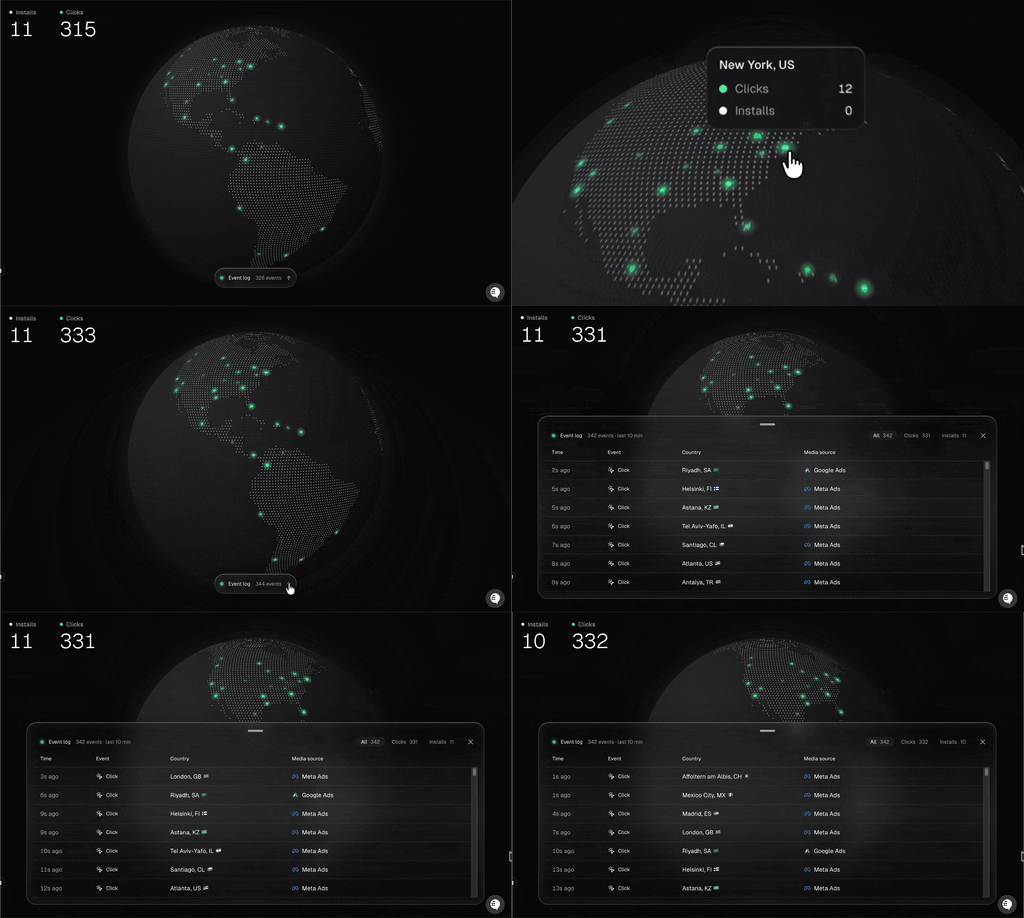
The Live page showing clicks and installs on a globe with the event log

See your clicks and installs from the last 10 minutes on a live globe, with an event log you can filter and click and install totals alongside it.

Open the Live page →
01

Cohorts in your dashboards

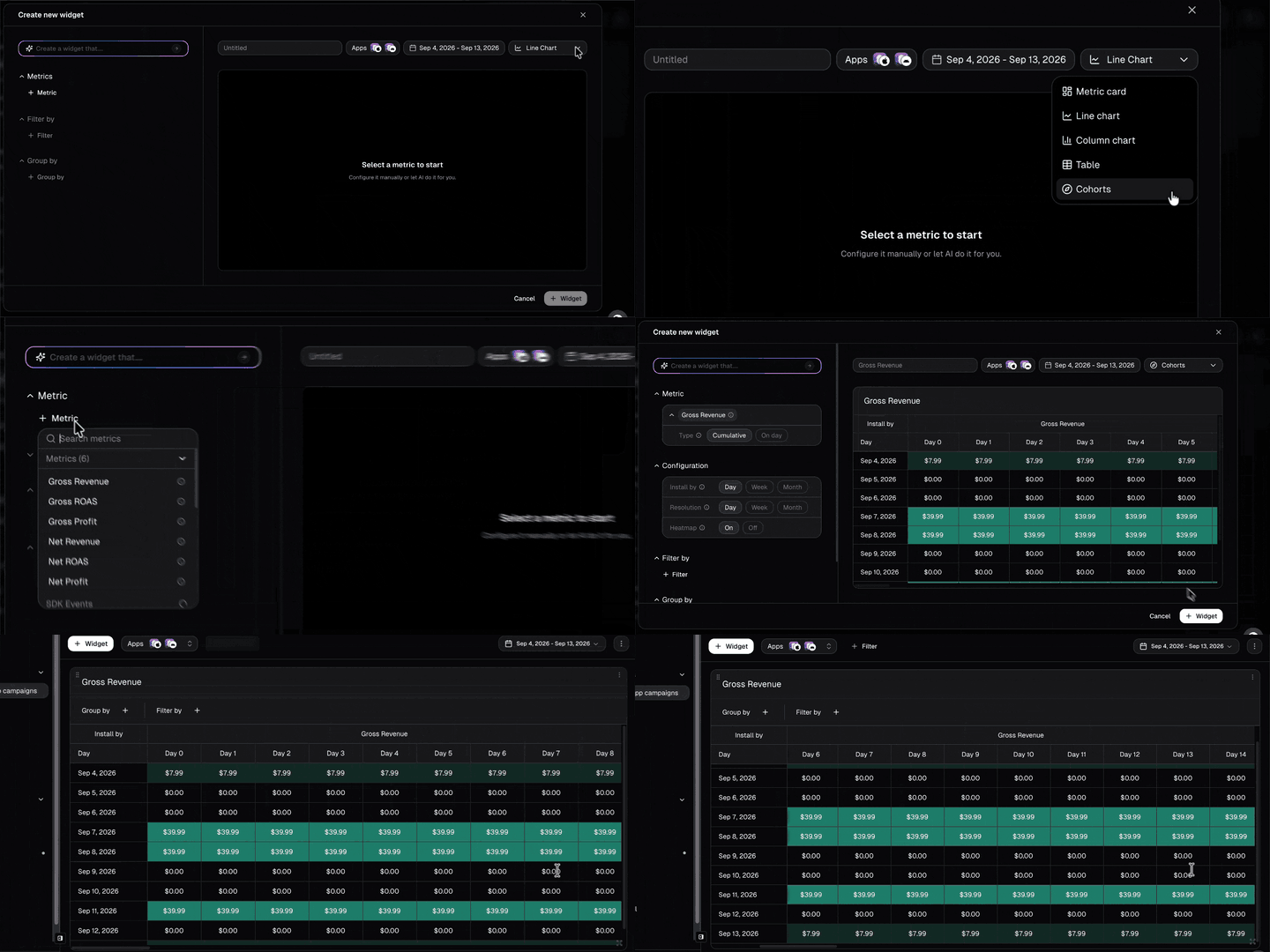
You can now add a cohort table as a widget on your dashboards.

Adding a cohort table as a widget on a dashboard Open Dashboards →
02

Links, redesigned

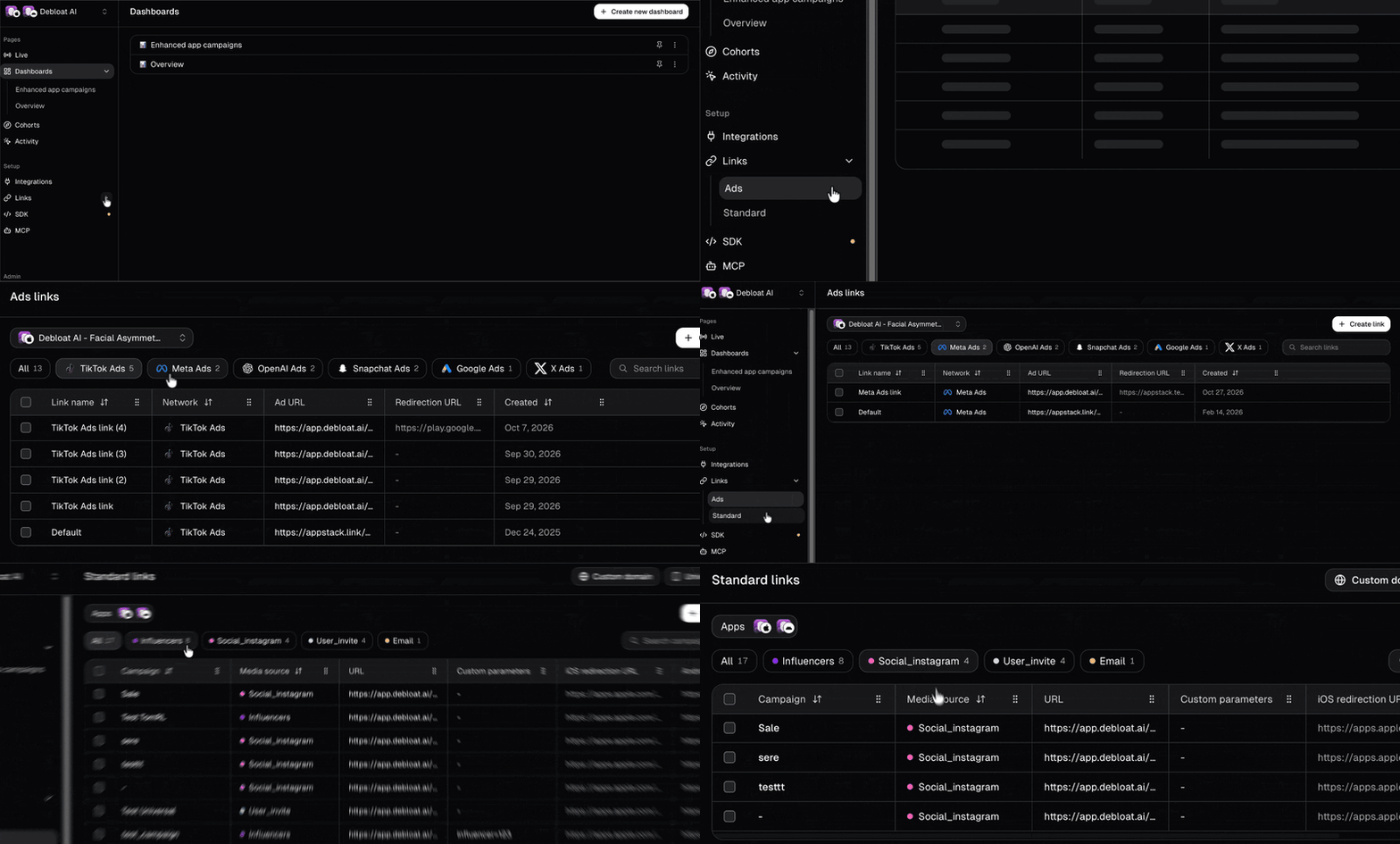
Ad links and standard links now live on their own pages, each with a new design.

The new Ad links and Standard links pages Open Links →

New

4
  • Standard links update themselvesWhen you add an iOS or Android app to a project, your existing standard links now update so people on the other platform land on the right store. Links you created before adding the second app are updated too.
  • Regenerate your SDK keyOrganization admins can now regenerate an SDK key from the SDK page and the debugger. The old key stops working after a short period.
  • Unity in Appstack skillsOur Appstack skills now cover the Unity SDK, so your AI coding assistant can help you set it up.
  • Attribution match status in SDKOn Android and Flutter, getAttributionParams() now waits for the attribution match and includes its match status.

Improved

3
  • Names shown exactly as sentDimension and metric names in your dashboards now show exactly as they arrive instead of being reformatted.
  • Ad link columns always visibleThe ad links table now shows every column, and we removed the integration columns menu.
  • S2S prefix in User JourneyServer-to-server events now show an s2s_ prefix in User Journey and in its event filter, so you can tell them apart from SDK events.

Fixed

6
  • Apple test installsInstalls from development and TestFlight builds are no longer counted as Apple Ads installs under an unnamed N/A campaign.
  • Wrong campaign in user historyOn installs claimed by Apple Ads, a click from another network like Meta no longer shows Apple's campaign and ad set in the user history.
  • Sandbox events in SDK debuggerSuperwall and Stripe sandbox purchases now show up in the SDK debugger, so testing no longer looks broken.
  • S2S event types on SDK pageThe SDK page now shows the right type for server-to-server events, instead of listing every one as STANDARD and AUTOMATIC when you sent CUSTOM or MANUAL.
  • MCP links ignored custom domainLinks created through the MCP now use your project's custom domain, just like links created in the dashboard.
  • Shared link analytics on mobileThe shared link analytics view now works on mobile.